Blog

  • BenQ ScreenBar Halo Review

    BenQ ScreenBar Halo Review

    Introduction

    The BenQ ScreenBar Halo is a revolutionary lighting solution designed to enhance your workspace and elevate your productivity. In this review, we’ll delve into the features, performance, and overall user experience of the ScreenBar Halo, exploring how it can transform your desktop setup.

    Unboxing and Initial Impressions

    Upon receiving the BenQ ScreenBar Halo, the packaging impresses with its sleek and professional presentation. Opening the box reveals the ScreenBar Halo itself, securely nestled within foam padding. The build quality is immediately apparent, with a sturdy yet elegant design that exudes premium craftsmanship.

    Features and Specifications

    One of the standout features of the BenQ ScreenBar Halo is its advanced LED lighting technology. The ScreenBar Halo boasts a high-quality LED light source that provides consistent and flicker-free illumination, reducing eye strain during long hours of work. Additionally, users can adjust the color temperature of the light to suit their preferences, whether they prefer a warm, cozy glow or a cool, refreshing ambiance. The auto-dimming functionality is another notable feature, allowing the ScreenBar Halo to automatically adjust its brightness based on ambient lighting conditions. Plus, the ScreenBar Halo is conveniently powered via USB, eliminating the need for additional cables or power adapters.

    Installation Process

    Setting up the BenQ ScreenBar Halo is a breeze, requiring minimal effort and no specialized tools. The ScreenBar Halo can be easily attached to the top of your monitor using the included mounting bracket, which fits snugly onto most monitor sizes. Once attached, users can adjust the ScreenBar Halo to achieve the perfect angle and position for optimal lighting.

    User Experience

    The user experience of the BenQ ScreenBar Halo is nothing short of exceptional. The illumination quality is outstanding, providing uniform and glare-free light that evenly illuminates the entire work surface. The ergonomic benefits are immediately noticeable, with the ScreenBar Halo helping to reduce eye strain and fatigue during extended periods of use. Additionally, the intuitive controls and customizable settings make it easy to tailor the lighting to your specific preferences, whether you’re working, reading, or relaxing.

    Performance and Efficiency

    In terms of performance, the BenQ ScreenBar Halo delivers on all fronts. Not only does it provide superior illumination compared to traditional desk lamps, but it also consumes less power, making it an energy-efficient choice for eco-conscious users. The impact on productivity and work efficiency is significant, with the ScreenBar Halo creating an optimal lighting environment that enhances focus and concentration. And thanks to its durable construction and reliable performance, the ScreenBar Halo is sure to stand the test of time, providing years of dependable use.

    Comparison with Alternative Lighting Solutions

    When compared to alternative lighting solutions, such as traditional desk lamps or other ScreenBar models, the BenQ ScreenBar Halo stands out as a clear winner. Its sleek and space-saving design takes up minimal desk real estate, while its advanced features and customizable settings offer unparalleled versatility and convenience. Plus, with its competitive price point, the ScreenBar Halo offers exceptional value for money compared to other premium lighting solutions on the market.

    Conclusion

    In conclusion, the BenQ ScreenBar Halo is a game-changer in the world of desktop lighting. With its innovative features, superior performance, and stylish design, the ScreenBar Halo redefines the way we illuminate our workspaces. Whether you’re a professional looking to enhance your productivity or a creative seeking inspiration, the BenQ ScreenBar Halo is the ultimate lighting solution for your desktop setup.

  • Logitech Combo Touch for 12.9-inch iPad Pro (5th Generation) Review: The Cheaper, Great Alternative to Magic Keyboard

    Logitech Combo Touch for 12.9-inch iPad Pro (5th Generation) Review: The Cheaper, Great Alternative to Magic Keyboard

    Introduction

    If you’ve recently invested in Apple’s latest 12.9-inch iPad Pro but find yourself hesitant about splurging on the pricey Magic Keyboard, the Logitech Combo Touch presents itself as a compelling alternative. In this comprehensive review, we’ll delve into the features, performance, and overall value proposition of the Logitech Combo Touch, exploring whether it’s the ideal companion for your iPad Pro needs.

    Specs

    • Price: $329, available on Lazada and Shopee
    • Connectivity: Apple Smart Connector
    • Weight: 780g

    Design

    The Logitech Combo Touch boasts a two-piece design comprising a protective case with an integrated kickstand and a detachable keyboard with a trackpad. This design allows for four versatile use modes – viewing, sketching, reading, and typing – catering to various user preferences and activities.

    Performance

    Priced nearly $200 cheaper than Apple’s Magic Keyboard, the Logitech Combo Touch offers exceptional value for money. Both the protective case and detachable keyboard feature a fabric-like exterior, providing a sturdy grip and resistance to slippage and scratches. The grey colorway adds a touch of sophistication while effectively concealing dirt and smudges.

    Features

    One of the standout features of the Logitech Combo Touch is its seamless integration with the iPad Pro via the Smart Connector, eliminating the need for charging or pairing. The detachable keyboard offers a familiar layout with responsive keys and a full row of iPadOS shortcut keys for enhanced productivity. Additionally, the auto-adjusting backlit keys with 16 levels of brightness ensure comfortable typing in any environment.

    Usability

    While the Combo Touch excels in usability and functionality, its design does have some drawbacks. The extended rear kickstand may take up more table space compared to the Magic Keyboard, and its weight of 780g makes it slightly heavier. Furthermore, the lack of a USB-C port for charging may be a downside for some users.

    Conclusion

    In conclusion, the Logitech Combo Touch emerges as a worthy contender to Apple’s Magic Keyboard, offering excellent value for money without compromising on performance or features. Whether you’re typing emails, sketching ideas, or binge-watching your favorite shows, the Combo Touch provides versatility and functionality in a sleek and affordable package.

    Ratings

    • Design: 8/10
    • Performance: 8/10
    • Value for Money: 8/10
    • Overall: 8/10
  • Samsung Galaxy Z Fold3 5G Review: Third’s the Charm

    Samsung Galaxy Z Fold3 5G Review: Third’s the Charm

    Introduction

    The Samsung Galaxy Z Fold3 5G, the third iteration of Samsung’s foldable smartphone, has made its debut in Singapore amid much anticipation and excitement. With reports of it being sold out shortly after its release, many are left wondering if it’s worth the hype. Let’s dive into the details and explore whether the Galaxy Z Fold3 lives up to its expectations.

    Specs

    • Price: S$2,398 (256GB), S$2,548 (512GB); available on Lazada and Shopee
    • Processor: Qualcomm Snapdragon 888 5G
    • Main Display: 7.6-inch QXGA+ Dynamic AMOLED, 2,208 x 1,768 pixels
    • Cover Display: 6.2-inch HD+ Dynamic AMOLED, 2,268 x 832 pixels
    • Operating System: Android 11
    • Rear Cameras: 12MP ultra-wide-angle, 12MP wide-angle, 12MP telephoto
    • Front Camera: 4MP
    • Cover Camera: 10MP
    • Memory: 256GB/512GB; 12GB RAM
    • Battery: Non-removable 4,400mAh
    • Weight: 271g

    Design

    The Galaxy Z Fold3 retains the signature foldable design of its predecessors, seamlessly transitioning from a compact smartphone to an expansive tablet-like display. Despite its sleek and innovative form factor, the Fold3 is sturdier than ever, featuring a stronger aluminum frame and boasting an IPX8 water resistance rating for added durability.

    Performance

    Powered by the Qualcomm Snapdragon 888 5G processor, the Galaxy Z Fold3 delivers top-notch performance, effortlessly handling multitasking, gaming, and productivity tasks. The inclusion of a 120Hz refresh rate on both the main and cover displays ensures smooth and responsive touch interactions, enhancing the overall user experience.

    Features

    One of the standout features of the Galaxy Z Fold3 is its under-display selfie camera on the main screen, eliminating the need for a distracting punch-hole or notch. This allows users to immerse themselves fully in the stunning visuals without any obstructions. Additionally, the Fold3 supports the S Pen stylus, enabling users to unleash their creativity and productivity on the expansive display.

    Usability

    While the Fold3 excels in usability and functionality, it does have some drawbacks. The narrow cover screen may pose challenges for typing and navigating, and the absence of expandable storage may limit storage options for users with large media libraries. However, the ability to open up to three apps simultaneously in a split-screen layout on the main display enhances productivity on the go.

    Camera

    The Galaxy Z Fold3 features a versatile triple-camera system, delivering sharp and vibrant images in various lighting conditions. However, the under-display selfie camera may not match the quality of the cover camera, exhibiting softer details and noticeable purple fringing. Nonetheless, the camera performance overall remains commendable.

    Battery Life

    With its non-removable 4,400mAh battery, the Galaxy Z Fold3 offers respectable battery life, lasting a full day with moderate usage. However, battery performance may vary depending on the usage patterns and display settings.

    Verdict

    In conclusion, the Samsung Galaxy Z Fold3 5G emerges as a formidable contender in the foldable smartphone market, offering a perfect blend of innovation, performance, and versatility. While its premium price tag may deter some potential buyers, those seeking a cutting-edge device that seamlessly combines the functionalities of a smartphone and a tablet will find the Fold3 to be a worthy investment.

    Ratings

    • Features: 9/10
    • Design: 9/10
    • Performance: 8/10
    • Battery Life: 8/10
    • Value for Money: 7/10
    • Overall: 8/10
  • JABRA EVOLVE2 BUDS REVIEW: PERFECT WORK BUDS?

    JABRA EVOLVE2 BUDS REVIEW: PERFECT WORK BUDS?

    Introduction

    Jabra, a leader in personal sound and office solutions, has expanded its true wireless range with the latest addition to its Evolve series – the Evolve2 Buds. Designed to enhance concentration and facilitate collaboration, these true wireless buds are tailored for professionals who are constantly on the move. With certification for leading virtual meeting platforms and advanced noise reduction technology, the Evolve2 Buds aim to deliver clear calls and uninterrupted focus.

    Pros

    • Companion App Customizations: The companion app offers EQ adjustments and control customizations, allowing users to personalize their audio experience.
    • Waterproof and Dust-Resistant Design: With an IP57 rating, the Evolve2 Buds are built to withstand water and dust, ensuring durability in various environments.
    • Excellent Mic Clarity: The buds feature outstanding microphone clarity, making them ideal for important calls and virtual meetings.
    • USB Adapter Inclusion: The inclusion of a USB adapter provides a more stable connection, particularly beneficial for Unified Communications (UC) users.
    • Wireless Case Charging: The wireless charging case adds convenience, allowing users to charge on the go without the hassle of cables.

    Cons

    • No aptX Support: The absence of aptX support may be disappointing for users seeking high-fidelity audio streaming.
    • Separate Models for UC and Teams Edition: The need for separate models for Unified Communications (UC) and Microsoft Teams may cause confusion for some users.

    What’s In the Box?

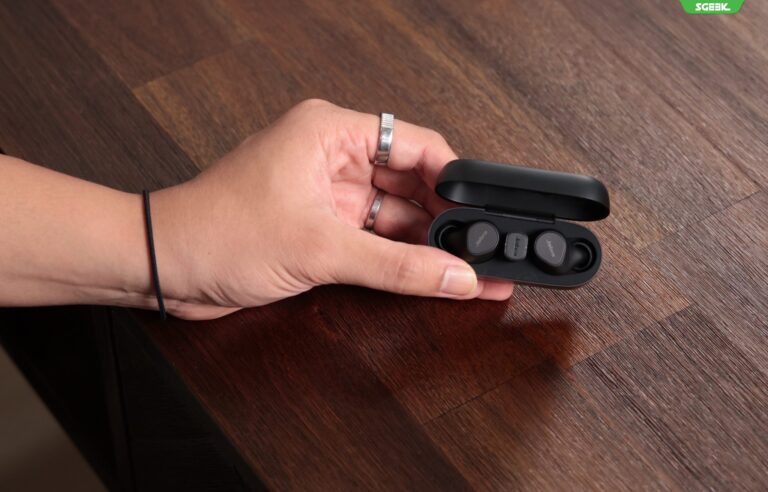
    The Evolve2 Buds come packaged with a USB dongle (available in USB-A or USB-C options) corresponding to the user’s edition preference (UC or Teams). Additionally, the inclusion of five different silicone tip sizes ensures a comfortable and secure fit for users of all ear sizes. The buds and USB dongle conveniently fit inside the wireless charging case, providing portability and protection.

    Connectivity

    Featuring Bluetooth 5.2 compatibility and support for AAC and SBC codecs, the Evolve2 Buds offer reliable connectivity and the ability to connect to multiple Bluetooth devices simultaneously. The inclusion of a USB adapter ensures stable connections, especially during crucial calls or virtual meetings.

    Sound Quality

    The Evolve2 Buds prioritize high-quality conversations with Jabra MultiSensor Voice™ technology, utilizing a combination of four microphones, bone conduction sensors, and advanced algorithms to minimize background noise. The Jabra Sound+ app allows for in-app customization of ANC (Active Noise Cancellation) and EQ settings, enhancing the user’s audio experience.

    Ergonomics/Comfort/Features

    Designed for extended wear, the silicone tips ensure comfort during long work hours and leisure activities. The buds feature ANC for immersive music enjoyment during commutes, along with intuitive touch controls for music playback. The auto-pause feature enhances user convenience by automatically pausing playback when one earbud is removed.

    Conclusion

    The Jabra Evolve2 Buds are an excellent choice for individuals frequently engaged in work calls and virtual meetings. With effective ANC, superb battery life, and fast charging capabilities, these buds offer convenience and performance. While the lack of aptX support may disappoint audiophiles, the in-app customizations and overall functionality make the Evolve2 Buds a compelling option for professionals seeking reliable audio solutions. Available at an RRP of S$424, the Evolve2 Buds are now accessible through the Jabra official store or on Shopee.

  • PAIRING THE SONY A7C CAMERA AND FE 24-70MM F2.8 GM II: IS IT STILL RELEVANT IN 2022?

    PAIRING THE SONY A7C CAMERA AND FE 24-70MM F2.8 GM II: IS IT STILL RELEVANT IN 2022?

    Introduction

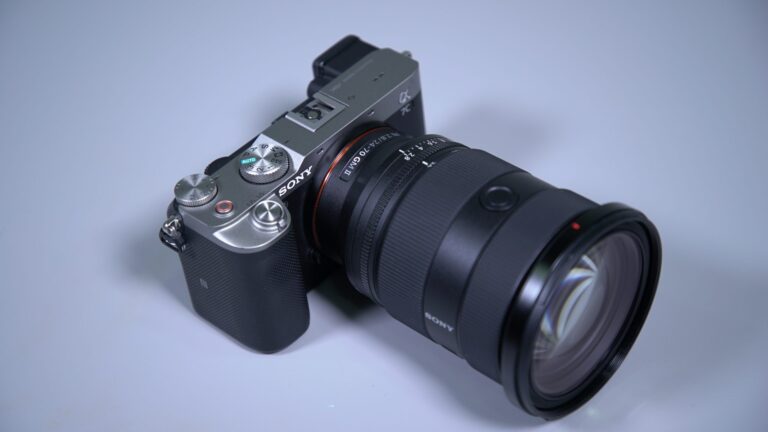
    Sony’s A7C camera has garnered praise in the photography community for its versatility and reliability. Designed to cater to professional photographers, the A7C offers a compact yet powerful solution for various shooting scenarios. Paired with the FE 24-70mm F2.8 GM II lens, this combination promises exceptional performance and flexibility. But in a rapidly evolving market, is this pairing still relevant in 2022?

    What We Love About the Sony A7C Camera

    The Sony A7C impresses with its lightweight and compact design, making it ideal for on-the-go professionals. Despite its small size, it boasts features like a flip screen with touch control and in-camera image stabilization. The advanced autofocus system, including Eye AF, ensures precise focusing, even in challenging conditions.

    Pocket Rocket – A Lightweight Setup that Packs a Punch

    The A7C’s compact size makes it perfect for professionals seeking a lightweight setup without compromising performance. With features like a fully articulating flip screen, it caters to vloggers and solo content creators, offering flexibility in framing and shooting angles.

    Perfect Accompaniment – Pairing it with the Sony 24-70mm GM II

    The Sony 24-70mm F2.8 GM II lens complements the A7C perfectly, offering versatility and exceptional image quality. Designed as a lightweight yet professional-grade lens, it provides a wide zoom range and impressive resolution. Whether capturing wide shots or close-ups, this lens delivers sharp, artifact-free images with swift focusing capabilities.

    Conclusion – The Go-To Setup for Portable Shooters

    Despite being in the market for a couple of years, the Sony A7C and FE 24-70mm F2.8 GM II lens remain relevant and highly sought after by photographers. The combination offers a compelling solution for professionals seeking portability without compromising on performance. With features like fast autofocus and a versatile zoom range, this setup is well-suited for event coverage and various shooting scenarios. For photographers on the move, the A7C and 24-70mm GM II lens duo continues to be the go-to choice, providing reliability and exceptional image quality in a compact package.

  • Dyson Introduces the Dyson Purifier Big Quiet Formaldehyde

    Dyson Introduces the Dyson Purifier Big Quiet Formaldehyde

    Introduction

    Dyson, renowned for its innovative approach to home technology, has unveiled its latest breakthrough: the Dyson Purifier Big Quiet Formaldehyde. Combining cutting-edge purification technology with a focus on quiet operation and the elimination of formaldehyde, this new addition to Dyson’s lineup sets a new standard for indoor air quality.

    The Need for Clean Air

    Indoor air pollution is a significant concern, with pollutants such as formaldehyde posing health risks ranging from respiratory issues to long-term health effects. Dyson recognizes the importance of addressing this issue and has developed the Dyson Purifier Big Quiet Formaldehyde to provide a solution.

    Key Features

    Advanced Purification Technology

    The Dyson Purifier Big Quiet Formaldehyde is equipped with advanced purification technology that captures 99.97% of airborne particles as small as 0.3 microns. This includes common pollutants like dust, pollen, and pet dander, as well as volatile organic compounds (VOCs) such as formaldehyde.

    Quiet Operation

    With its specially designed acoustic architecture, the Dyson Purifier Big Quiet Formaldehyde operates quietly, ensuring minimal disruption to your indoor environment. Whether you’re working, sleeping, or relaxing, you can enjoy cleaner air without the noise.

    Formaldehyde Detection and Elimination

    Formaldehyde, a common indoor pollutant found in household items such as furniture and flooring, is known to have harmful health effects. The Dyson Purifier Big Quiet Formaldehyde features formaldehyde sensors that continuously monitor indoor air quality and automatically adjust purification settings to eliminate this pollutant.

    Air Quality Monitoring and Reporting

    Equipped with intelligent sensors, the Dyson Purifier Big Quiet Formaldehyde continuously monitors indoor air quality and provides real-time feedback via the Dyson Link app. Users can easily track pollutant levels, temperature, and humidity, ensuring peace of mind and control over their indoor environment.

    Sleek and Modern Design

    Designed to complement any living space, the Dyson Purifier Big Quiet Formaldehyde features a sleek and modern design with intuitive controls. Its compact footprint makes it suitable for placement in various rooms, from bedrooms to living rooms and home offices.

    Conclusion

    The Dyson Purifier Big Quiet Formaldehyde represents a significant advancement in indoor air purification technology. With its focus on eliminating formaldehyde and providing quiet operation, it offers a comprehensive solution for improving indoor air quality and promoting healthier living environments. Experience the difference with Dyson’s latest innovation and breathe easier knowing your home is protected.

  • Exploring Photo Editing with Adobe Express: A Firefly Perspective

    Exploring Photo Editing with Adobe Express: A Firefly Perspective

    Introduction

    Adobe Express is a user-friendly mobile app designed for on-the-go photo editing. With its intuitive interface and powerful features, it offers a convenient solution for enhancing your images directly from your smartphone. In this article, we’ll delve into the world of photo editing with Adobe Express from the perspective of a Firefly enthusiast.

    Getting Started with Adobe Express

    To begin your journey with Adobe Express, simply download the app from the App Store or Google Play Store. Once installed, launch the app and familiarize yourself with its interface. You’ll find a range of editing tools and effects neatly organized for easy access.

    Exploring Editing Tools

    Adobe Express offers a plethora of editing tools to enhance your photos. From basic adjustments like brightness and contrast to advanced features like selective editing and healing brush, there’s something for every editing need. As a Firefly enthusiast, you can use these tools to bring out the vibrant colors of these fascinating insects or highlight intricate details in their wings.

    Adding Firefly Magic with Effects

    One of the highlights of Adobe Express is its collection of creative effects. Whether you want to add a touch of magic with light leaks or create a dreamy atmosphere with bokeh effects, the app has you covered. Experiment with different effects to enhance the mystical aura of Fireflies captured in your photos.

    Crafting Captivating Collages

    In addition to single photo editing, Adobe Express allows you to create stunning collages effortlessly. Showcase multiple Firefly images in beautifully arranged layouts and add text or stickers to personalize your creations. Collages are a great way to tell a visual story and capture the enchanting beauty of Fireflies in different settings.

    Sharing Your Firefly Masterpieces

    Once you’ve perfected your Firefly photos with Adobe Express, it’s time to share them with the world. The app offers seamless integration with social media platforms like Instagram, Facebook, and Twitter, allowing you to showcase your creations with just a few taps. Share your love for Fireflies and inspire others with your stunning images.

    Conclusion

    Adobe Express is a versatile tool that empowers Firefly enthusiasts to unleash their creativity and bring their photos to life. Whether you’re a beginner or seasoned photographer, the app offers a range of editing tools and effects to suit your needs. Explore the magic of Fireflies through the lens of Adobe Express and let your imagination soar.

  • ASUS Bucks Large Display Trend to Launch 5.9-Inch Smartphone: Zenfone 8 in Singapore

    ASUS Bucks Large Display Trend to Launch 5.9-Inch Smartphone: Zenfone 8 in Singapore

    Introduction

    In a market dominated by smartphones with ever-expanding screen sizes, ASUS has taken a bold step with the launch of its Zenfone 8, featuring a compact 5.9-inch display. Breaking away from the trend of larger screens, ASUS aims to cater to consumers who prioritize one-handed usability and pocket-friendly dimensions without compromising on performance and features.

    Embracing Compact Design

    Pocket-Friendly Dimensions

    The ASUS Zenfone 8 stands out for its compact form factor, making it easy to hold and operate with one hand. With dimensions that prioritize portability, this smartphone offers a refreshing alternative to bulkier devices on the market.

    Ergonomic Design

    Designed for comfort and usability, the Zenfone 8 features ergonomic curves and a sleek profile that fits comfortably in the palm of your hand. The compact size ensures effortless handling, allowing users to navigate the device with ease.

    Powerful Performance

    Flagship Specifications

    Despite its compact size, the Zenfone 8 packs a punch in terms of performance. Powered by the latest Qualcomm Snapdragon processor and equipped with ample RAM and storage options, this smartphone delivers flagship-level performance for seamless multitasking, gaming, and productivity.

    Smooth and Responsive Experience

    With a high-refresh-rate display and optimized software, the Zenfone 8 offers a smooth and responsive user experience. Whether you’re scrolling through apps, browsing the web, or playing games, you can expect fluid performance and snappy responsiveness.

    Immersive Multimedia

    Stunning Display

    Despite its smaller size, the Zenfone 8 features a vibrant and immersive display that enhances multimedia viewing experiences. Whether you’re streaming videos, viewing photos, or playing games, the high-quality display delivers crisp visuals and vibrant colors.

    Impressive Audio

    ASUS has prioritized audio quality with the Zenfone 8, delivering immersive sound that elevates the multimedia experience. Whether you’re listening to music, watching movies, or making video calls, the Zenfone 8 ensures crystal-clear audio reproduction.

    Advanced Camera Capabilities

    Versatile Camera System

    Equipped with a versatile camera system, the Zenfone 8 enables users to capture stunning photos and videos in a variety of scenarios. From wide-angle landscapes to close-up portraits, the smartphone’s camera setup delivers impressive results with rich detail and vibrant colors.

    AI-Powered Features

    With AI-powered enhancements and intelligent camera algorithms, the Zenfone 8 makes it easy to capture professional-quality photos with minimal effort. Whether you’re a photography enthusiast or a casual user, the smartphone’s advanced camera capabilities ensure stunning results in any situation.

    Conclusion

    The ASUS Zenfone 8 challenges the status quo in the smartphone market by offering a compact and pocket-friendly alternative to larger devices. With its ergonomic design, powerful performance, immersive multimedia features, and advanced camera capabilities, the Zenfone 8 proves that good things do come in small packages. Whether you prioritize portability, one-handed usability, or simply prefer a smaller form factor, the Zenfone 8 delivers a compelling smartphone experience without compromise.